Use Start and End Frames to Connect First-Person Shots
Choose a clear opening composition and matching end state. Overlap viewpoint, direction, and prop position to help first-person POV clips cut together.
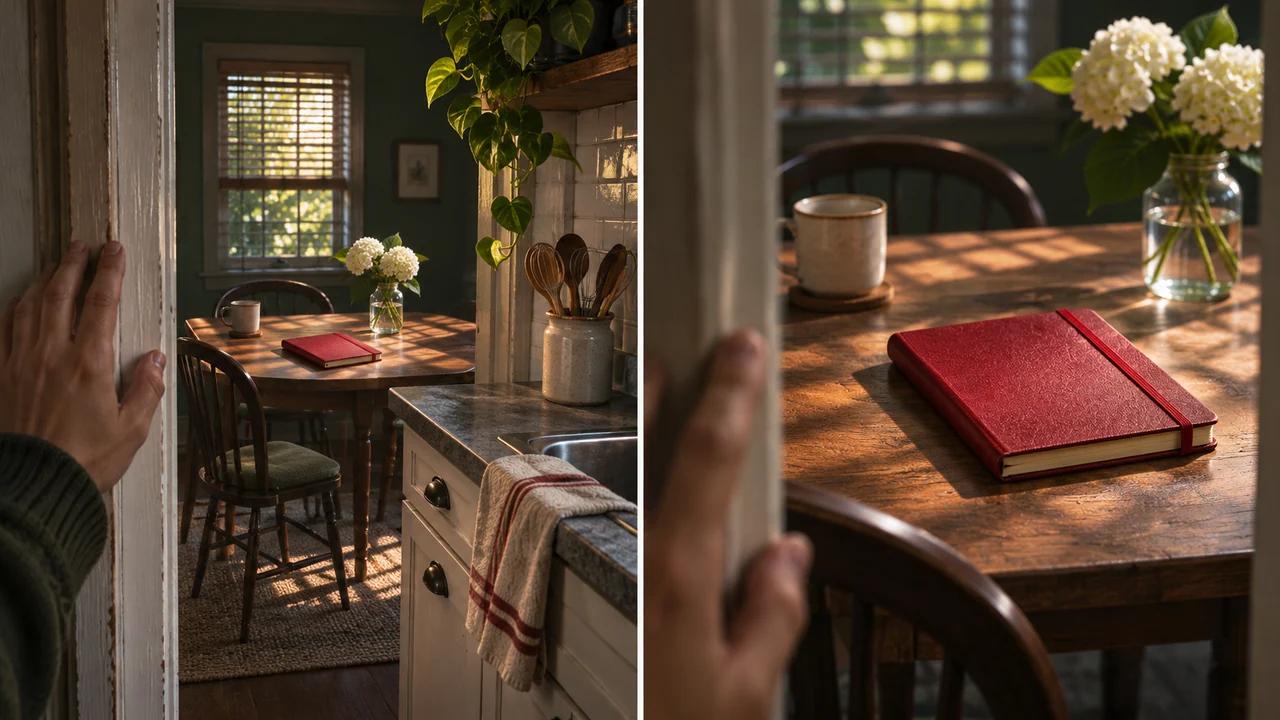
What you’ll take away
- Choose a clear opening composition and matching end state.
- Use a fixed landmark and prop state to join separate clips.
Choose the two frames across the cut
Write down viewpoint height, travel direction, and important object positions at the outgoing and incoming frames. If one clip ends with the right hand on a half-open door, begin the next at a compatible side of that door. Reuse a visual anchor such as a lamp or door edge. Favor cuts at a pause rather than mid-turn, and decide whether the edit continues motion or skips time.
Write down your landmark and object positions
Write both states in plain language, not just camera coordinates. “The viewer is at the kitchen doorway; the counter is on the right; a red notebook lies closed on the table” gives an editor visible anchors. State whether the new shot begins before or after the action. If a cut happens after the notebook is picked up, the next frame should not show it still on the table. If the scene skips ahead, use a new establishing view to make the time jump clear. A repeated object, doorway, or window can help reorient the audience after that transition.
When possible, create an edit from the final selected frames instead of trusting prompts alone. Compare horizontal lines and landmarks, then trim at a moment when motion is minimal. If the camera movement must continue across the cut, match screen direction: movement toward the right edge should not reverse without an intentional turn. Keep a note of any sound bridge that crosses the transition. A soft continuous ambience can smooth the edit, but it cannot repair a visual jump in position. Check the clip sequence on the target aspect ratio before finishing.
Check the start of the next action
A cut should continue or deliberately interrupt an action. Write which of those is intended. If the camera crosses a threshold between generations, note whether the viewer has already crossed at the incoming frame. Preserve a landmark and camera height so a viewer can orient quickly. When no compatible frame is available, place the cut at a pause and establish the new view before movement resumes. Google Flow and other tools can differ in how they organize clips, so verify the controls in current documentation rather than assuming an exact feature.
Sources & further reading
Put it into practice
- A Repeatable Faceless Content Workflow: Idea to Published Video
- How to Write AI Video Prompts That Produce Usable Shots